Ever since I switched from iTunes to using web-based music players (Google Music, Amazon Cloud Player, and Pandora), I’ve wanted the ability to control them with global keyboard shortcuts. The other day, I finally took the time to set it up, and I’m very happy with the results:
If you’re interested in setting this up for yourself (or simply learning about how it works), download the project files here, then follow these instructions:
- Unzip the project files. You should see a directory called “music_control”.
- Make sure you have node.js installed, then cd into the “music_control” directory and start the server with:
node server.js. - Cd into the “extension” directory and open “background.html” in your favorite editor. Change the
SERVER_HOSTvariable to reflect your host name. - In Chrome, go to Window > Extensions. Make sure “Developer Mode” is checked.
- Click on “Load unpacked extension,” then navigate to the “extension” directory. (You can also package the extension and install it normally by double-clicking on the resulting “music_control.crx” file.)
- Install any application that lets you map global keyboard shortcuts to shell scripts (or AppleScripts, but I prefer bash). I used an app called Shortcuts, but I’m sure there are plenty of free alternatives.
- Setup whatever keyboard shortcuts you want to map to the following bash commands (note that you can use something like
wgetrather thancurlif you prefer):curl "http://localhost:8000/music?play"curl "http://localhost:8000/music?next"curl "http://localhost:8000/music?previous"
- You’re done! You should now be able to control you web-based music players with keyboard shortcuts.
I realize there are a lot of moving parts here, and any number of ways to accomplish the same thing. If you decide you don’t want to use this exact implementation, hopefully this will at least get you started down the right path of your own setup. Let me know if you get this working and/or if you adapt the concept to something equally or even more interesting. I have lots of ideas for where this could go.
 Whenever cloud services like EC2 or Google Docs experience downtime, there are always plenty of comments about the dangers of relying on the cloud. While it’s true that depending on third parties (both your ISP and the provider of the cloud service itself) for basic computing tasks like document editing can be risky, it’s also important to look at and understand the entire equation before evaluating cloud services. Here are some things to consider:
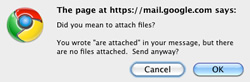 Below are five simple tips that will help you make the most of your Gmail account:
 Living Digitally