How to Read EPUB Files on Your Amazon Kindle

I'm a big fan of the Amazon Kindle, but one of the issues I've had with it is that it doesn't support EPUB files natively. Fortunately, there's a free and relatively easy way to convert EPUB files into the Kindle's native Mobipocket file format.

The easiest way I've found to read EPUB files on the Kindle is to use Amazon's free tool, KindleGen, to convert EPUB files into the Mobipocket format. KindleGen is a tool for publishers designed to convert existing HTML and EPUB files into the Kindle's native file format. You can download it for free from Amazon and use it yourself to convert EPUB files into a Kindle-friendly format.

To read EPUB files on your Kindle, follow these steps:

  1. Download KindleGen for your platform (available for Windows, Mac, and Linux — thank you, Amazon, for cross-platform support).
  2. Follow the instructions for converting your EPUB files into the Mobipocket format.
  3. Connect your Kindle to your computer via USB. It should appear as a mounted drive or volume.
  4. Drag your new EPUB files into your Kindle's "documents" directory.
  5. Eject or unmount your Kindle, and you should find your books available in your library.

There are several other EPUB readers out there that support EPUB files natively and don't require you to go through a conversion process, but I really like the Kindle platform for other reasons, so it's worth the additional step for me.

Everything You Need to Know About How to Digitally Self Publish

Final Update: I’m now publishing with a traditional publisher, so I haven’t updated this page in quite a while. Some of this information will still be relevant, but some will also be obsolete, so make sure you cross reference with other (better maintained) sources. Good luck!

Update (9/27/2011): Added the section on copyrights.

Update (5/15/2011): Changed DTP (Digital Text Platform) to KDP (Kindle Direct Publishing) in accordance with Amazon’s rebranding.

Update (10/1/2010): Added details about PubIt, and added the royalty chart.

If you’re thinking of publishing to the Amazon Kindle, Apple iBooks store, or to the Barnes & Noble Nook, this article will provide you with everything you need to know to get started. It is the result of many hours of research and experimentation, and probably represents the most comprehensive guide on digital self-publishing currently available. Keep in mind that this is necessarily a living document; I’ve been shocked at how much the industry has changed just since early 2010, and I expect it to continue to change at an equally rapid pace for the foreseeable future. As it does, I will update this resource to reflect everything I continue to learn.

Introduction

Digital publishing has been around in one form or another for many years (starting with early eBook readers from Sony and devices like Palm PDAs), but it wasn’t until Amazon introduced the Kindle — and then Apple followed up with iBooks and Barnes & Noble with the Nook — that eBook readers really went mainstream.

I’ve been digitally self-publishing fiction on these new platforms for about as long as it has been possible. I’m a huge believer in digital publishing, but the truth is that it’s not nearly as easy as it should be. The industry is changing extremely quickly as are the tools, devices, and the best practices. The newness of the industry, and the pace at which it continues to evolve, means that mastering digital self-publishing is still pretty challenging. I’ve spent a huge amount of time learning the ins and outs both through research and trial and error, so I decided to put together this comprehensive resource to try to make digital self-publishing more accessible to as many other writers as possible.

Continue reading

Review of the New Kindle 3

I’ve been a big fan of the Amazon Kindle since its initial release, and I’ve faithfully upgraded with every new generation. The Kindle 2 was a huge improvement over the first model, and the newest third generation Kindle appears to be a worthy and worthwhile successor, as well.

The biggest differences between the Kindle 2 and the Kindle 3 are:

kindle_3_comparison

The very compact Kindle 3 on top of the larger Kindle 2.

  • Better screen. Amazon claims that the Kindle 3 has 50% better contrast than any other e-reader. I’m not exactly sure how contrast is quantified, but I can say that the Kindle 3’s screen is much better than the Kindle 2’s. In fact, the first thing I noticed about the Kindle 3 after unpacking it was how much whiter the background looked.
  • Smaller form factor. The Kindle 3 is 21% smaller than the Kindle 2 and 17% lighter. In terms of dimensions, that’s about half an inch smaller in both width and height. Note that the 6″ screen remains the same size.
  • Wi-Fi version. Amazon is now selling a Wi-Fi version for $139 and a 3G version for $189. I decided to go with the Wi-Fi version and save the $50.
  • Better battery. I haven’t really been able to test the battery thoroughly yet, but Amazon claims that the Kindle 3’s battery will last up to a month (with wireless turned off). Based on the battery performance of my other Kindles, I would say that’s probably accurate.
  • More storage. My Mac reports the size of the Kindle 2 as 1.59GB, and the size of the Kindle 3 as 3.33GB. Amazon says that’s enough to store 3,500 books.
  • Faster page turns. Amazon says the page turns on the Kindle 3 are 20% faster. Honestly, that seems low to me. I would say the Kindle 3 is at least 50% faster if not even more, but I’m not doing actual benchmarks. Let’s just say that the Kindle 3 is noticeably and significantly faster.
  • Better fonts. The fonts on the Kindle 3 appear thicker and darker.
  • No joystick. The Kindle 3 replaces the navigation joystick of the Kindle 2 with a D-pad. So far, I think I prefer the new D-pad.
  • Rubberized backing. The Kindle 2 has a brushed metal backing and the Kindle 3 has a nice soft rubberized coating on the back.
  • Better PDF reader. The new PDF reader on the Kindle 3 supports looking up words in the dictionary, notes, and highlighting. I don’t find the Kindle particularly useful for PDF viewing because PDF text gets scaled rather than reflowing, but if PDF viewing is important to you, the Kindle 3’s improvements will probably be a welcomed upgrade.
  • WebKit-based browser. WebKit is the standard for mobile browsers now, and Amazon has built it into the the Kindle 3. I don’t consider this a very important feature, however; frankly, I think you’d be crazy to browse the web on any Kindle. The Kindle 3’s browser works much better than previous Kindle’s, but if you have a computer, smart phone, or tablet anywhere nearby, you’re always going to reach for it over your Kindle when you need to look something up on the web. That said, in a pinch — when you’re out at the pool and your phone and your iPad are both up in the room — it’s serviceable.
  • New color. I bought the graphite version which is the only Wi-Fi option available, but the 3G version comes in graphite or white.

The three features that mean the most to me are the higher contrast screen, smaller size, and faster page turns. These are the things that you will notice right away, and that you will appreciate throughout the entire life of the product. The new lower prices are nice, as well. The cheaper the Kindle gets, the more places and situations you’re willing to expose it to, and hence, the more useful it becomes. I still don’t think we’ve hit that magical price point where purchasing a Kindle and keeping it with you at all times is a no-brainer, but we’re definitely one step closer.

The Epoch Index

epoch_index_150x225

Quinn Mitchell is a nine-to-five spy. She’s a data analyst for the CIA during the day, and a suburban wife and mother on evenings and weekends. After a series of personal struggles and professional failures, Quinn hopes to find redemption in her newest assignment: a series of bizarre assassinations where victims are found with three-digit numbers tattooed, burned, or carved into their flesh. As Quinn pursues the killer across the globe — always one body behind — their lives become entangled in ways neither of them can predict.

This novella by Christian Cantrell takes place in a world bordering on unprecedented change: as oil-based economies shift to hydrogen, the majority of wealth is redistributed across the globe; as aging nuclear arsenals are replaced with even more menacing threats, terrorists try to seize opportunities to tip the balance of power; and as humans become increasingly dependent on machines, massive indexes of information accumulate which can reveal almost anything about anyone to those who know how to use them.

The Epoch Index is a story about a world changing faster than humanity can adapt to it — a world which may require us to redefine what it means to be a hero.

Availability:

Tour of My New Home Office

Here’s a quick tour of the home office I recently finished building. If you’re thinking of designing your own office, hopefully this will give you some ideas and inspiration.

A quick summary of things I did right:

  • Lots of light switches meaning very flexible task lighting (including dimmers).
  • Very large closet (with its own light).
  • Wire shelving that is both strong and configurable. Additionally, the light can easily penetrate the openings in order to reach lower shelves. (Use foam core board on any shelves that hold straps or other small items that you don’t want to fall through.)
  • Two workstations configured for different kinds of tasks. My primary workstation also raises and lowers.
  • Liberal amounts of insulation, especially in the ceiling. Insulation obviously helps keep the temperature comfortable, but it also keeps the noise down.
  • Bamboo flooring. It’s cheap, durable, environmentally friendly, and looks as good as more expensive hardwoods, in my opinion.
  • Reading chair. Sometimes it’s nice to get away from the computer and relax in a nice comfortable chair.
  • Isolated circuit. My office is on its own electrical circuit, so if something else in the house trips a breaker, it won’t shut off power in my office.
  • Coaxial and network jacks. My wireless signal is pretty strong down here, but I went ahead and ran a network cable anyway for the additional bandwidth.

Things I did wrong:

  • No power outlets at desk-height. I put in a lot of power outlets (12 in a relatively small room), but I didn’t install any at desk height. Unfortunately it didn’t occur to me until after the drywall was in.
  • No track lighting. I used recessed lighting rather than track lighting. Tracks would have given me some additional configurability, and the ceilings are probably high enough.

Review of the Apple Magic Trackpad

I know there have been a lot of posts and reviews of Apple’s new Magic Trackpad already, but most of them lack one critical element: actual experience with it. After using Apple’s newest pointing device exclusively for two weeks straight both at work and at home, here are my impressions:

Pros:

  • Very large surface — much larger than the trackpad built into your MacBook.
  • Great click action. Clicking works through the rubber feet on the bottom and feels great. Just like with the built-in trackpad on my MacBooks, sometimes I tap and sometimes I click.
  • Good gesture support. I’m a big believer in gesture and touch-based computing (which is only in its infancy), and the Magic Trackpad is definitely a step in the right direction.
  • Good battery life. I use rechargeable batteries for my mice, remotes, and other devices (the Energizer Family Battery Charger rather than Apple’s), so I don’t worry about having to replace batteries, but I also don’t want to have to do it weekly. I’ve been using two Magic Trackpads extensively for two weeks, and the batteries are still strong.
  • Integrates nicely with Mac keyboards. The size and shape make it a natural extension of your Apple bluetooth keyboard. I use a USB keyboard (fewer batteries to have to keep charged), but it still integrates well. (Note that if you prefer “tap to click,” keyboard integration can also be a con as noted below.)
  • Looks brilliant. As we’ve come to expect from Apple, the design is great. And unlike some other Apple devices I’ve used in the past, functionality wasn’t sacrificed for aesthetics.

Cons:

  • When too close to your keyboard (its form factor suggests that it should be positioned as a keyboard extension), it’s way too easy to inadvertently tap which means your cursor jumps away from where you’re typing. For this reason alone, I experimented with turning off “tap to click,” but eventually ended up just moving the trackpad further away.
  • No USB version. Although the battery life seems good, I would have probably bought a USB version for $10 or $20 less if it had been an option. I actually find USB peripherals more convenient since you don’t have to keep batteries in the charger at all times and in your bag when you travel.
  • Still not as precise as a mouse. Of course, this isn’t really the fault of the Magic Trackpad itself. In my experience, this is simply the nature of trackpads. They’re excellent for when you don’t have a mouse, and I’m happy to use one all day or even for several days in a row while on the road, however eventually, you start to realize that you’re just slightly less productive than you are with a mouse.

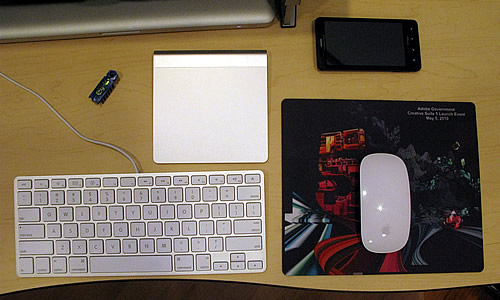
mouse_trackpad_workspace

Conclusion:

I’ve gone back to using the Magic Mouse (by far the best mouse Apple has ever made, and probably my favorite mouse of all time — if you’re not convinced, read my review) for most things simply because I’m more accurate with it which means I’m more productive. However, I’ve also incorporated the Magic Trackpad into my workspace, as well (along with my Hexbug Nano). I use the mouse as my primary pointing device, and I use the trackpad for gestures and for scrolling. Maybe I’ll experiment with having one on either side of the keyboard at some point so that I look like I’m piloting a macha rather than just moving a pointer.

In general, I really like the new Magic Trackpad, and I’m glad to see Apple move us one step closer to touch-based computing. But don’t put your Magic Mouse up on eBay just yet.

Why Google Needs to Find Social Success

It’s incredible to me that the same search engine technology which seemed indomitable only a few years ago is now being seriously threatened by something most of us initially mistook for a silly diversion: social networks. The point is best illustrated with a story:

My daughter’s hermit crab recently died and she’s been asking for a guinea pig to replace it. There was a time when the first thing I would do is search Google for information on guinea pigs and do research to see if they would make a suitable pet for an eight-year-old girl. Not anymore. Instead, the first thing my wife and I did was query our social networks.

Two things are happening that are seriously undermining search engines right now:

  1. Because of Facebook and Twitter, we now have the ability to ask just about everyone we know and trust anything we want and get extremely relevant responses usually within minutes.
  2. The internet is flooded with extremely low-quality content designed to be nothing but search engine bait making search-based research less and less efficient.

In other words, the quality of the results I get from search engines like Google is declining while the quality and relevancy of results I get from Facebook and Twitter is increasing. And this is happening alarmingly fast.

To put things into perspective, I still use Google (and even Bing sometimes) several times a day — dozens, in fact — and by no means am I predicting the death of anyone. However, I am finding that my search queries are now divided into two distinct categories:

  1. Information seeking. If I want to know how long it takes for a wildebeest calf to be able to start walking after birth (yes, I actually looked this up the other day), I use Google (and frequently end up at Wikipedia).
  2. Question asking. When I have a specific question about something (Do guinea pigs make good pets for young children? Which brand of printer is most Mac-friendly? Should I go Nikon or Canon?), I almost always turn to social networks first.

(As an aside, a third but less relevant category is navigation: most sites have such poor navigation that it’s often faster to use Google to find a particular page inside a site than to use a site’s own navigation or search. Sad but true.)

What’s interesting (and potentially very alarming) about these categories is their relevancy to advertising. I’m finding that the kinds of searches I do with Google these days are less relevant to commerce than the searches I do through social networks. In other words, I’m not going to pay for information about wildebeests, but if I’m researching the differences between Nikon and Canon DSLRs, I’m likely in the market for a camera and poised to spend some serious money. As you can imagine, this is a huge problem for Google.

So why are many of us unconsciously drifting away from using Google for certain kinds of search? The answer is surprising: because Google has become a victim of its own success. Google’s search algorithms fueled an explosion in advertising revenue, both for Google and for publishers (sites hosting Google ads). Advertising has become such a big business with such low barriers to entry (thanks largely to blogging) that the amount of content specifically tailored to capture search engine traffic has increased at an astounding rate. Unfortunately, as its growth has increased, its quality and relevancy have plummeted.

I’ve become increasing frustrated with the quality of result I get from Google, and increasingly suspicious. I would estimate that at least half of the links I click on lead to information that was generated purely to capture search traffic and show ads. It’s getting more and more difficult — and taking more and more time — to find high-quality results through search engines while simultaneously getting increasingly easy and efficient to simply ask my friends and let the information come to me.

Search engines need to diversify. Bing is branding itself as a decision engine rather than a search engine which I think is interesting and will very likely prove an excellent distinction. Google seems to be experimenting with the decision engine approach, as well (hence their recent purchase of ITA, I suspect), but Google is also trying to figure out how to be social. Google Talk, Google Buzz, Google Wave, Google Profiles, the ability to search your social network, and the rumored "Google Me" service are all strong evidence that this is certainly not escaping Google’s attention (nor has it escaped the attention of Facebook and Twitter). However, in the area of social networking, Google is looking more and more like Microsoft: struggling to find a foothold, launching branded service after branded service hoping that one will eventually stick. This isn’t necessarily a criticism — Thomas J. Watson said that the best way to increase your rate of success is to increase your rate of failure. However, Einstein also said that the definition of insanity is doing the same thing over and over again and expecting different results.

It’s time for Google to do something very different.

Epilogue

Although it’s search engines that are immediately threatened by social networks, e-commerce sites are next. It won’t be long before we’re buying and selling through our social networks, as well.

Want a Free Copy of CONTAINMENT?

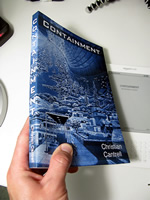
containment_free_offerUpdate: I’m out of free copies for now, but I hope to have more in the future. Thanks for your interest! In the meantime, there are several other ways to get your hands on Containment.

I’m giving away free copies of my new science fiction novel, Containment. All I’m asking is that you do one of the following after you’ve read it:

  • Blog about it.
  • Post something on Twitter.
  • Share it on Facebook.
  • Leave a review on Amazon.
  • Post through some other form of social media (your choice).
  • (Optional) Pass it along to someone else who loves science fiction.

Of course, there’s no requirement for your post or review to be positive. Just tell the world what you honestly think.

If you want a free copy of Containment, please contact me through my Google profile and include the following:

  • Your name.
  • Your address.
  • Whether or not you want a signed copy.

It will probably take a couple of weeks for me to get you your copy since, in order to do this efficiently, I’m going to have to do the ordering and mailing in bulk. Also, depending on demand, this offer may expire at any moment. And finally, one copy per address, and since I’m covering all costs, US addresses only, please.

If you don’t want to wait for your copy to arrive in the mail (or if you’re outside the US), there are several other ways to get Containment right now.

New Short Story: Anansi Island

I just published a new short story called Anansi Island. This one is equal parts science fiction and horror. If you like either genre, check it out. Here’s the description:

A quiet and remote wildlife refuge, Anansi Island was the perfect place for Laurel to escape her past. But throughout the island’s history, its isolation also made it the perfect place to hide things the world was never meant to see.

As Laurel finds herself entangled in the island’s newest and most bizarre chapter, she must not only solve its mysteries, but also survive long enough to pass them on.

This short story by Christian Cantrell mixes science fiction and horror with endearing and enigmatic characters who can only solve the mysteries of Anansi Island by facing their worst fears.

anansi_island_350x525

If You Want to Know the Future of Software, Just Look at Email

I’ve often said that if you want to see the future of software, look no further than email. It may seem odd to think of email as a killer app since most of us don’t like it very much and because it’s been around for so long, but I firmly believe that email is actually one of the best models on which to base future technology. Here’s why:

  • The data is separate from the client. While my email lives safely on a server (in the cloud, as we’re fond of saying these days), I can access it from any number of device-specific clients. On the desktop, I use Mail.app. In the browser, I use Gmail. On my phones, I have clients optimized for touch and small screens. On my iPad, I have a mail client optimized for a slightly larger screen and a virtual keyboard. Email is available from almost every device I own, and every device has a client which is optimized for its particular characteristics.
  • Data is seamlessly synchronized. For many years, I used POP3 simply because it was so widely supported, but my life changed the day I switched to using IMAP. Suddenly all my mail, mail boxes, and the state of individual messages was synchronized across all my devices and clients. I currently access my email from no fewer than three devices (sometimes more) every day without even thinking about it.
  • Email protocols are simple and widely supported. One of the reasons we can access email from just about anywhere using just about any device is the fact that POP3 and IMAP are relatively simple protocols. Libraries are widely available in just about all languages, and where they’re not available, they aren’t hard to write. Nobody owns the protocols, so everyone is free to implement them, and to build any kind of client on top of them that they want — everything from massive enterprise solutions, to simple notification widgets.

Now think about what life would be like if everything worked like email. Imagine if all your music, videos, documents, contacts, source code, preferences, etc. lived in the cloud, and you could access all your data not just from any device, but from clients specifically designed for the strengths of particular devices. Imagine everything being perfectly and seamlessly synchronized, and imagine if accessing all your data on a brand new device (or through any web browser) was as simple as configuring a new email client: just type in a user name, password, and maybe some server information, and within a few minutes, everything is there, and everything is perfectly synchronized and customized for the device that you’re currently using.

I’m certainly not making the claim that email is perfect, or even all that good, for that matter. And I certainly don’t believe that email itself is the future since things like text messaging, Facebook, Twitter, Google Wave, etc. are decreasing our dependency on email every day. But the model that email represents — data in the cloud, device-specific clients and experiences, synchronization, and open protocols — is almost certainly the future, and the irony is that it’s been right under our noses all this time.