AirPlay is Another Nail in Cable’s Coffin

airplay

I had an interesting experience while sitting around with some friends Saturday night. The subject of awkward pregnancy photos came up (my sister-in-law is weeks away from giving birth), so we decided to bring up the pregnancy category of Awkward Family Photos for a few good laughs at other people’s expense. Having just installed Mountain Lion (OS X 10.8), I decided to use AirPlay from my 11″ MacBook Air (best laptop ever) to my Apple TV so everyone could see better. The conversation eventually turned to politics and TED talks as it so often does, so I threw up Nick Hanauer’s excellent and very controversial TED talk. Eventually control of the Apple TV was passed around the room via iPhones, iPads, and AirPlay, and in addition to playing a few hilarious rounds of Draw Something and laughing at hundreds of photos, we watched some Olympics highlights, Portal: No Escape, Lego Black Ops, the JK Wedding Entrance Dance (there was an uninitiated among us), and finally, one of Stephen Colbert’s many excellent interviews with Neil deGrasse Tyson. By that time, it was getting late, however we’d barely scratched the surface of our favorite videos, sites, games, photos, memes, etc. so I’m certain we’ll pick right back up where we left off next weekend.

There were three things that really struck me about the evening:

  1. All of the entertainment throughout the course of the night was entirely free. We did have to watch a few YouTube pre-roll ads, but they were quick and relatively tasteful.
  2. The evening was much more interactive than if we’d watched a movie or a few TV shows.
  3. The experience was extremely collaborative and inclusive as control of the Apple TV was passed around the room and everyone got to have their say in what we all experienced.

I’ve been a cord-cutter for a long time now which means we’re as likely to spend our evenings with our phones, laptops, and tablets as we are with our TV. In fact, since I do most of my gaming either on a PC or handheld device, I’ve frequently wondered if we still actually need a 52″ LCD taking up space in our living room. However last night was the best reason I’ve come up with in probably two years to keep my TV.

If you’re a cord-cutter, next time you have people over, ask them to come up with some of their favorite internet content and put together your own interactive and collaborative programming. I’ve never been so certain in my decision to cancel my cable service as I am now.

(Note that AirPlay is not the only technology for making this kind of thing work, but in my experience, it’s probably the most hassle-free. I have a Nexus Q which I hope to use more for this kind of thing in the future, and I’ve experimented with all kinds of streaming media solutions in the past. At least for now, Apple’s technology is probably the easiest to use, most robust, and — since so many people have iPhones, iPads, or Mac laptops — it’s more or less ubiquitous.)

Video Review of the Google Nexus 7 Tablet

I’ve spent about a week with the Nexus 7 tablet now so I thought I’d do a quick video to capture my impressions:

If you’d rather read than watch, here are the highlights:

  • I really like the 7-inch form factor. Since I have an 11″ MacBook Air, 10-inch tablets don’t feel all that portable to me. 7-inch tablets are very portable, very light, allow me to easily type with my thumbs, and are much easier to hold for long periods of time while reading.
  • The performance is excellent. The combination of the hardware and Android 4.1 (Jelly Bean) make the Nexus 7 as smooth and polished as any iOS device.
  • The battery life seems very good. I didn’t explicitly test it, but I’ve only had to charge the Nexus 7 a few times since I started using it. It may not be as good as something like the iPad, but I found the battery to be more than sufficient.
  • I’m not crazy about the emphasis on the Google Play store by default. Since it competes with the Kindle Fire, the Nexus 7 is designed primarily as a content consumption device (which also justifies the very aggressive pricing — Google wants to make money on the ecosystem rather than hardware). Fortunately all the conduits into the the Google Play store are implemented as widgets which you can just delete in order to get a more traditional tablet experience. I should point out that I actually like the Google Play store and have used it several times already — I just don’t want it to be the central experience of my tablet.
  • My only complaint/request is that I want to be able to buy a higher-end version. I like this device enough that I’d happily pay more for a rear-facing HD camera and 4G wireless support. That said, I know Google is competing with the Kindle Fire, and the price is extremely aggressive for such a capable device. I think Google is doing the right thing for now, however I hope they release versions with more features in the future.

To summarize: great device which is absolutely worth the $199/$249 price.

Controlling Web Based Music Players with Global Keyboard Shortcuts

Ever since I switched from iTunes to using web-based music players (Google Music, Amazon Cloud Player, and Pandora), I’ve wanted the ability to control them with global keyboard shortcuts. The other day, I finally took the time to set it up, and I’m very happy with the results:

If you’re interested in setting this up for yourself (or simply learning about how it works), download the project files here, then follow these instructions:

  1. Unzip the project files. You should see a directory called “music_control”.
  2. Make sure you have node.js installed, then cd into the “music_control” directory and start the server with: node server.js.
  3. Cd into the “extension” directory and open “background.html” in your favorite editor. Change the SERVER_HOST variable to reflect your host name.
  4. In Chrome, go to Window > Extensions. Make sure “Developer Mode” is checked.
  5. Click on “Load unpacked extension,” then navigate to the “extension” directory. (You can also package the extension and install it normally by double-clicking on the resulting “music_control.crx” file.)
  6. Install any application that lets you map global keyboard shortcuts to shell scripts (or AppleScripts, but I prefer bash). I used an app called Shortcuts, but I’m sure there are plenty of free alternatives.
  7. Setup whatever keyboard shortcuts you want to map to the following bash commands (note that you can use something like wget rather than curl if you prefer):
    • curl "http://localhost:8000/music?play"
    • curl "http://localhost:8000/music?next"
    • curl "http://localhost:8000/music?previous"
  8. You’re done! You should now be able to control you web-based music players with keyboard shortcuts.

I realize there are a lot of moving parts here, and any number of ways to accomplish the same thing. If you decide you don’t want to use this exact implementation, hopefully this will at least get you started down the right path of your own setup. Let me know if you get this working and/or if you adapt the concept to something equally or even more interesting. I have lots of ideas for where this could go.

Inspired by the Past

Not long ago, I took my two daughters out of school for the day and the three of us went on a field trip to Udvar-Hazy Air and Space Museum. I made a deal with them: they could miss school for the entire day if they promised to listen to everything I told them, read everything I asked them to read, and answer questions at the end of the day. I wasn’t taking them out of school to ride simulators and eat freeze-dried ice cream; we were going in search of inspiration.

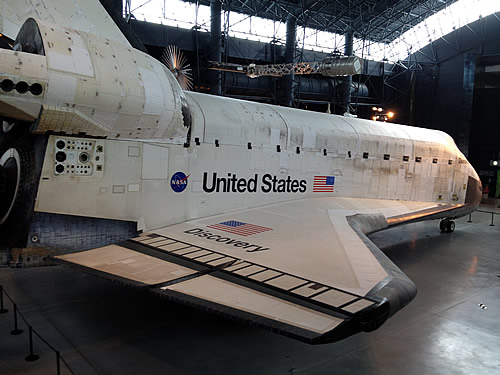
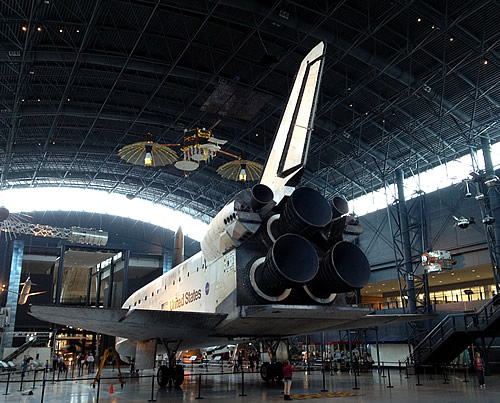
The idea was prompted by the arrival of Discovery (which I also took them out of school to watch). I was about the age of my youngest daughter when the Space Shuttle Columbia first launched on April 12, 1981, and now, thirty-one years later, we were witnessing the (hopefully temporary) end of manned space flight in the United States. It suddenly occurred to me that without adequate education, children today might never know that:

  • Putting astronauts into low Earth orbit was once considered almost routine (the Space Shuttle fleet flew a total of 135 missions);
  • Forty-three years ago — more than four years before I was even born — man first walked on the moon, accomplishing a feat that doesn’t seem even remotely possible in today’s economic and political climate;
  • As children, we frequently saw the Concorde — a supersonic transport jet capable of traveling at over Mach 2 — fly overhead as it landed or took off from Dulles airport, conveying passengers from New York to Paris in only 3.5 hours — over twice as fast as brand new passenger jets being built today.

While I recognize that there’s a lot of fantastic innovation going on right now, we also appear to be in an era when the best way to inspire future generations is to look to the past.

discovery_1

The retired Space Shuttle Discovery.

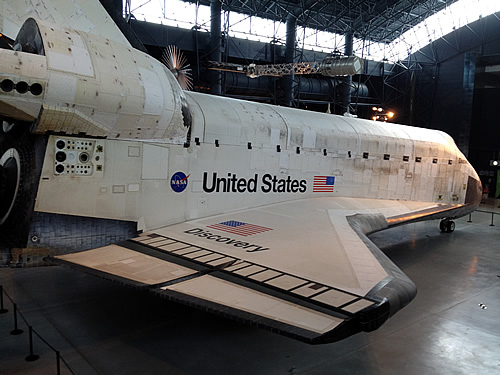
discovery_2

The retired Space Shuttle Discovery.

discovery_3

The retired Space Shuttle Discovery.

concorde_1

The nose of the Concorde.

concorde_2

The unmistakable delta-wing configuration of the Concorde.

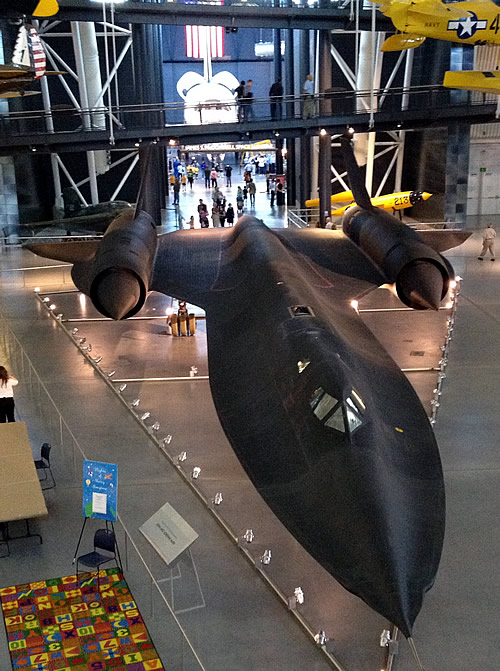
blackbird_1

The SR-71 Blackbird.

blackbird_2

Probably the best view in the entire museum. The SR-71 Blackbird in the foreground, and the Space Shuttle Discovery in the background.

blackbird_3

The top of the SR-71 Blackbird.

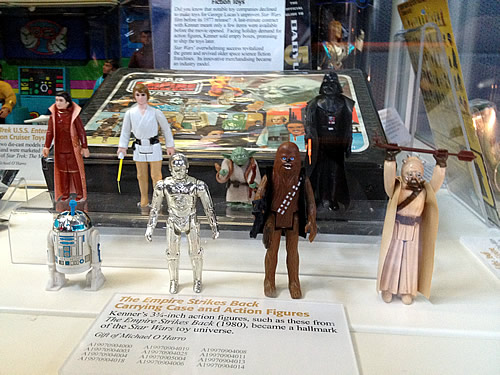
star_wars

Some of the toys that inspired me as a child.

4th Grade Egg Drop Project

My 4th grade daughter was recently given the customary elementary school egg drop project. I was out of town for the week leading up to the event which meant I couldn’t help her with the design, so we took a separate but collaborative approach. She designed a solution on her own, and when I got back into town (the day before the event), I designed my own solution. The plan was to take the best ideas from each design and combine them into one.

The rules of the challenge were as follows:

  • No parachutes, streamers, or balloons.
  • No bubble wrap or Styrofoam.
  • No food products (other than the egg, of course).
  • Each project had to have an easily accessible door so the teacher could load the egg.
  • The entire project couldn’t be more than 1.5 pounds (including the egg).

My daughter went with an empty peanut butter jar lined with foam squares:

peanut_butter_jar

I went with a plastic food container suspended by rubber bands inside of a 6″ x 6″ box:

6x6_box

Both seemed to be sound concepts, so we combined them into one:

combined_1

It turns out the box we used wasn’t deep enough and the rubber bands weren’t quite secure so the egg broke when dropped off the roof of the school. So the next iteration used a 12″ x 12″ box, popsicle sticks to hold the rubber bands in place (on the outside of the box), and velcro to keep the lid closed:

combined__2

Both her project and mine were thoroughly tested, and both were a success. We celebrated with a lunch of scrambled eggs:

scrambled_eggs

Building The Virtual Keyboard From TRON Legacy

tron_keyboard_500I’ve become a bit of a keyboard geek (proof here and here), so when I re-watched TRON: Legacy recently and saw Sam use that very cool blue-green virtual keyboard, I decided I had to try it for myself. I built one using two iPads and discovered it’s much more difficult to use than it looked in the movie. Below is an explanation of the project as well as my conclusions.

If you’re interested in the code I used to build the prototype, it’s all available on GitHub.

Space Shuttle Discovery’s Final Flight

Today we watched the Space Shuttle Discovery land at Dulles Airport on the back of a 747 for its final flight. It made two passes overhead, and I was well positioned for both.

Update (4/26/2012): I got a good look at Enterprise at Dulles airport today. It’s all loaded up and ready to leave for its new home in New York.

enterprise_500x205

Update (4/9/2012): I went to visit Discovery in her final resting place this morning. Absolutely magnificent.

discovery_in_museum

A Simple Phishing Vulnerability in Mobile Safari

I recently put together a demo of a very simple, yet very convincing, phishing attack targeting mobile Safari:

It works by first checking the user agent and determining what kind of device the request is being made on. If the device isn’t an iPhone, the user is simply forwarded to PayPal.com and will never know the difference. But if the request is made from an iPhone, the user gets the special phishing login screen which does the following:

  1. Shows an image of Safari’s location bar at the top which implies that the user is on PayPal.com.
  2. Scrolls the actual location bar off the screen quickly enough that very few people will notice it.

Since this attack targets mobile devices, it’s pretty safe to assume that many (probably most) users won’t be paying very close attention, and will likely not notice the actual location bar being hidden. The effect is so fast that even users who do notice probably won’t think anything of it.

I really like that mobile Safari lets you hide the location bar in order to have more pixels for actual content, but perhaps there’s a way to tweak the design in such a way as to make malicious applications of this feature less feasible.

Windows 8: A Giant Misstep Forward

windows_8_logo

I’ve been playing with the Windows 8 Consumer Preview since it was released, and have gotten very familiar with it. While I find Metro to be a pleasure to interact with, I’m convinced that Microsoft is about to make a mistake with Windows 8. In short, I have a feeling that Windows 8 is about to become the new Vista.

Continue reading