Turn Your Old Phone Into a Complete Sound System

droid_x_sound_system

I haven’t had a real sound system in years. As soon as we gave up CDs, there didn’t seem to be much of a point anymore. Everyone in my house has their own devices with their own music, and if we ever want to listen to the same thing (rarely), someone just plugs their phone into the set of common speakers in the living room.

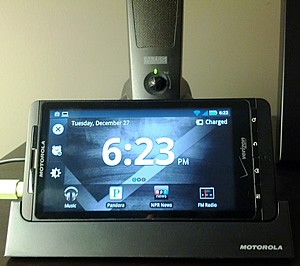
But even in an environment where everyone has constant access to their own personal content, it’s nice to occasionally share an experience. I’ve missed putting music on in the background while we eat, or sharing something new with those around me, so when I recently got a new Android phone (Galaxy Nexus), I decided to turn my next-to-worthless Droid X into a dedicated sound system.

Using a phone as a stereo is obviously not a new concept, but using one as a dedicated sound system is only now becoming practical for many people. Decent smartphones have been out long enough now that chances are you either have an extra one that isn’t worth anything anymore, or you probably will within the next year or so. I have a lot of phones and devices, but I think my Droid X is the first spare Android device I own that isn’t really worth selling, nobody else in my family wants, and that I haven’t come to completely hate (there are a lot of bad Android devices out there which I wouldn’t even want to use to stream music).

Fortunately, I’m not an audiophile, so I’m pretty happy with an underpowered and inexpensive setup. My “stereo” consists of the following:

  • An old deactivated Droid X.
  • The Droid X media dock.
  • A pair of old (but decent) computer speakers with a subwoofer.
  • A good wi-fi connection.
  • A few apps:
    • Pandora.
    • Google Music (giving us all access to my entire music collection).
    • Google Listen (for podcasts).
    • The NPR application (mostly for news).
    • An FM radio application (which I’ll probably never use, but that I feel like I should have installed anyway).

If it turns out we use the new setup frequently enough, I’ll probably get some better speakers (any suggestions?), but so far, an old phone, a good wi-fi connection, and a pair of previously disused Altec Lansing speakers are working out surprisingly well.

Scientists Propose Detecting Extraterrestrials Through Light Pollution (as Described in “Containment”)

alien_light_pollutionAstronomers Avi Loeb and Edwin Turner recently published a paper proposing a technique for detecting extraterrestrials: use telescopes to look for light pollution from alien cities. From the paper’s abstract:

This method opens a new window in the search for extraterrestrial civilizations. The search can be extended beyond the Solar System with next generation telescopes on the ground and in space, which would be capable of detecting phase modulation due to very strong artificial illumination on the night-side of planets as they orbit their parent stars.

I was thinking the same thing when I wrote Containment:

The telescope assembled on the far side of the Moon succeeded in capturing some stunning images, including a few faint pixels of possible light pollution originating from a small rocky planet in the habitable zone of a nearby solar system…

The SETI Institute (Search for Extraterrestrial Intelligence) is already using arrays of Earth-based radio telescopes to search for evidence of alien technology (as dramatized in Carl Sagan’s excellent novel, Contact). Since we’re already detecting exoplanets, it seems reasonable that within the foreseeable future, the technology could exist to measure light pollution on extrasolar planets, providing the first hard evidence of extraterrestrial intelligence. Perhaps alien civilizations have already detected us.

It’s fascinating to watch technologies dreamed up for the sake of science fiction gradually become reality. For instance, the idea of using the LHC for time travel, and artificial photosynthesis.

Introducing “Farmer One”

Update: Farmer One was purchased by StoryFront, and is now exclusively available on Kindle.

My newest book/novella, Farmer One, is now available in all formats (Kindle, Nook, iBooks, EPUB, and HTML). If you’ve read my other work, you’ll find that this one is a little different. It’s still science fiction, but I took it in a slightly new direction. Here’s the synopsis:

In an economically depressed and politically dysfunctional United States, the long-defunct National Aeronautics and Space Administration is reestablished in a desperate attempt to channel the patriotism and optimism of the previous century’s Soviet Space Race. But this time, the nation to beat is China, and the goal is Mars.

Far behind steady advances in Chinese aerospace engineering and even lunar colonization, a team of American scientists, engineers, and astronauts struggles to integrate decades-old technologies, untested prototypes, and some very out-of-the-box thinking to give their nation a shot at one of the most important achievements in human history. Nothing goes as planned while pursuing what appears to be the impossible, but the ultimate surprise lies in the mission’s conclusion.

This quirky and intelligent novella by Christian Cantrell is both humorous and unpredictable as it explores an unfamiliar, but not entirely unimaginable, post-superpower United States.

farmer_one_350x525

I owe special thanks to David Coletta and Ben Rossi for their excellent editorial assistance.

Before You Criticize the Cloud for Downtime

cloud_computingWhenever cloud services like EC2 or Google Docs experience downtime, there are always plenty of comments about the dangers of relying on the cloud. While it’s true that depending on third parties (both your ISP and the provider of the cloud service itself) for basic computing tasks like document editing can be risky, it’s also important to look at and understand the entire equation before evaluating cloud services. Here are some things to consider:
  • First and foremost, when you work 100% locally, you have to worry about the integrity of your own storage solution. I’ve had drives fail and/or files become corrupt several times over my career, and I lost much more time than I probably would have during a Google Docs or Amazon Web Service outage.
  • When you run everything locally, you need to spend time and money on a backup solution. Although there are a lot of great ways to back up data seamlessly and unobtrusively, there is still overhead involved in the form of configuration, maintenance, and even computer performance. Additionally, local backup solutions like Apple’s Time Machine and Time Capsule are insufficient; if you really want to be secure, off-site backups are imperative. (Take it from someone whose office recently sustained water damage after we got 12″ of rain in four days.)
  • If you work in the technology industry, you probably use more than one computer and/or go through computers faster than a typical consumer. Keeping data synchronized across computers, maintaining workstations, and configuring new machines all requires overhead which can be dramatically reduced by using more cloud-based services.
  • Although using cloud-based services puts you at the mercy of both the service itself and your ISP, I think you can make a pretty good argument that your ISP usually isn’t all that much of a risk. Even if I’m working 100% locally (writing code, editing video or image files, etc.), I am much less productive without an internet connection. In fact, I’m so dependent on various sites and web-based services that when my connection goes down (which is very rare), I’m more likely to walk away from my computer entirely than to continue working with local files.

All this is not to say that relying on the cloud doesn’t have risks associated with it, or that cloud-based services are always superior to working locally. In fact, although I’m hugely invested in, and dependent on, cloud-based services, I’m not convinced the day will ever come when I do all my work in the cloud. Additionally, aside from downtime, there are other things to consider when choosing to store data in the cloud — chief among them being security. However, before one criticizes cloud services for downtime, it’s important to understand that periods of time during which you cannot be productive come in many different forms, most of which are actually alleviated by using cloud-based services.

Free Copies of Containment: Audio and Paperback

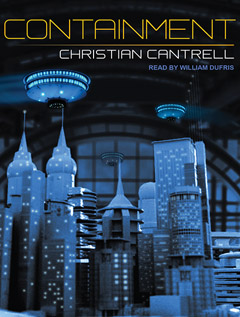
containment_audio_coverUpdate: I’m all out of copies, but I should have more in a few weeks. Thanks for your support!

Containment has sold over 70,000 copies, and recently passed the 300 review mark on Amazon. To celebrate, I’m giving away free copies. I have five audio books (7 CD box set), and five paperbacks. If you want one, here’s what to do:

  1. Leave a comment here to reserve your copy. Indicate if you want the audio version or the paperback. If you want the paperback, let me know if you want it signed or not.
  2. Send me your address and which version you requested through my Google profile. (Since I’m covering shipping, I need to limit this offer to the US, unfortunately.)
  3. Once you’ve read or listened to Containment, tell the world what you think. Post on Twitter, Facebook, Google+, reddit, your blog, etc. (Of course, there’s no requirement that you give Containment a positive review — just tell the world what you honestly think.)

If you don’t get one, I’ll do this offer again when I receive the next shipment, and once I hit 100,000 sales, I’ll do an even bigger giveaway. As always, your support is greatly appreciated.

How to Fix Games That Crash on Start-up in Steam

bioshock_logoI played Bioshock on Xbox shortly after it came out several years ago, and although I was blown away by the opening sequence, I had trouble getting into the rest of the game. I probably put about five or six hours into it before getting distracted by something else (Mirror’s Edge, probably), and soon forgot all about it. I hate leaving things like movies, books, and video games unfinished, however, so while I was between games recently, I decided to buy Bioshock through Steam and give it another go (ever since I built a new gaming PC, my Xbox has been relegated to nothing more than Netflix duty). With an open mind, and determined to assume a totally fresh perspective, I got the game downloaded, started it up, and watched it promptly crash.

Unfortunately for Bioshock, rather than troubleshoot the problem, I played Mass Effect 2, instead. But a few days later, just for fun, I decided to try again. I’ve had good luck playing older games in the past by changing the compatibility mode of the application to an older version of Windows, so I decided to start there. The problem, however, is that it’s a little bit harder to find games’ executables when you install them through Steam, but if you know where to look, you’ll see that they are installed just like any other binary on your machine. I found Bioshock under:

E:\Steam\steamapps\common\bioshock\Builds\Release

(Note that the first part of the path will obviously be different on your machine since you probably have Steam installed somewhere else.)

To change the compatibility mode of a Steam game (or any executable, for that matter), simply:

  1. Right-click on the game binary (application file).
  2. Go to Properties > Compatibility.
  3. Check the box that says “Run this program in compatibility mode for…”
  4. Select whichever compatibility mode works for the application you’re trying to launch.

In the case of Bioshock, I found that “Windows Vista (Service Pack 2)” worked, though I’ve used other modes for other games (depending on the age). Just click “Ok” and your game should launch properly through Stream the next time you start it up.

Update: If you’re having trouble with the sound, especially after Bioshock’s intro, see this thread on the Steam Users’ Forums.

Don’t Pay AT&T $20 Per Month for Text Messages — Switch to Google Voice

google_voice_iconAT&T is “streamlining” their text messaging plans effective August 21st (full story) — no doubt in preparation for the iPhone 5. In this case, “streamlining” is a business euphemism for “taking away lower-priced options that too many customers prefer.” More specifically, AT&T is getting rid of their $10 per month limited texting plan, and only offering a $20 per month unlimited option. They claim to be doing this because “customers have expressed a clear preference for unlimited plans,” however I have a strong suspicion that this has more to do with customers who prefer to pay less.

Unfortunately, Verizon customers shouldn’t be too smug about the news because our day is almost certainly coming, as well. There is so little competition in the mobile phone industry that AT&T and Verizon essentially operate in collusion. For instance, one company goes from one-year contracts to two, and after waiting a respectable period of time, the other does the same; as one company’s early termination fee goes up, so goes the other’s; one carrier gets rid of unlimited data in favor of tiered plans, and rather than offering a more attractive and competitive service, the other eventually makes the switch, as well. As long as consumers don’t have realistic alternatives, it’s more profitable to raise rates for existing customers (and/or provide less service) than it is to compete for new customers. (I know T-Mobile is still an option, but they will soon merge with AT&T, and Sprint just doesn’t have the network coverage and device selection it needs to satisfy a large percentage of customers.)

AT&T is telling existing customers that they will be able to keep their $10 per month plans, and that the price hike is only for new customers. I suppose that’s some consolation, however that won’t last long. The next time you upgrade your phone (remember, the iPhone 5 is coming!), you will discover that your grandfather status has expired. At that point, you will be right where the mobile phone industry wants you: out of options.

That’s why I recommend switching to Google Voice. Google Voice still isn’t as easy to set up as it should be, but once you get it configured, you get all of the following features:

  • Free unlimited texting (on both Android and iOS devices).
  • The ability to send and receive text messages from your browser using a Gmail-like interface.
  • One phone number that maps to multiple phones. (When someone calls your Google Voice number, you can have the call forwarded to multiple numbers simultaneously — home, office, mobile, etc.)
  • The ability to make voice calls from your browser (this is how I make most business calls now).
  • Free voicemail with very humorous speech-to-text (it’s good enough to skim and get a feel for a message, but don’t base any important decisions on this technology just yet).
  • All kinds of very sophisticated call filtering, screening, and grouping capabilities.
  • Integration with Google Contacts.
  • Seemingly unlimited archiving and indexing of text messages and voicemails. (If there is a limit, it’s very generous.)
  • Completely free.

I should point out that I don’t expect Google Voice to remain free indefinitely; the service can still be a little rough around the edges, so I’m guessing they’re waiting until it’s more robust before actually charging customers. However, assuming it’s a fair and competitive rate (I’m guessing maybe $10 – $20 per year), I will be happy to pay. Google Voice is far more innovative than just about anything AT&T or Verizon have done in recent memory (or distant memory, for that matter), and I’m happy to pay for services that provide real value.

If you use Android, Google Voice integrates seamlessly with the OS to the point where you won’t even be aware that you’re not using your actual mobile phone’s number. If you use iOS (that is, an iPhone), your life isn’t going to be quite as good. Unfortunately the Google Voice iOS application is very buggy and not all that well integrated into the OS, but in my opinion, it’s still much more functional and feature-rich than anything you get from your standard mobile phone plan. And even on iOS, it’s certainly better than paying $20 per month for text messages which, believe it or not, cost carriers all of about 0.0002¢ each.

Mechanical Keyboard Roundup

mx_keyswitchesUpdate (2/11/2013): Added a review of the Realforce 87U with Topre switches.

Update (1/14/2013): Added a review of the Filco Majestouch-2 with Cherry MX Red switches.

Update (2/1/2012): Filcos (my favorite mechanical keyboards at this point) are now available on Amazon!

Update (1/27/2012): Added a review of the Leopold Tactile Touch.

After sensing something profoundly lacking from the modern typing experience, I decided to delve into the world of mechanical keyboards. As is the case with most fetishes, I discovered that there are entire online communities, cultures, and movements surrounding the magic of the mechanical keyswitch. I could have easily spent many months and several thousands of dollars acquiring, experimenting with, and reviewing all of the mechanical options out there, but with both time and money in short supply, I decided to focus on five specific models: the Das Keyboard Model S Professional, Filco Majestouch-2, DSI Modular, Matias Tactile Pro 3, and the Unicomp SpaceSaver M.

There is a lot of personal preference involved in picking a mechanical keyboard. Factors like key travel, clickiness, tactile feedback, weight, force, build quality and more all contribute to the typing experience, and all of these things mean different things to different people. Keep in mind that the reviews below represent my own opinions, and I tried to differentiate between things that personally appeal to me (clickiness, for example), and more objective characteristics (like build quality). The upshot is that there is no clear winner, and you will probably just need to try a few of these out to see which ones inspire you to get out of bed in the mornings and begin your day of typing.

If you know you want a mechanical keyboard and you’re just here to see and hear about some different models, skip on down to the video reviews. But if you’re wondering why in the world someone would buy a relative expensive mechanical keyboard when you can get a membrane or scissor-switch keyboard for far less (and sometimes for free), read on.

Continue reading

The Best Air-filtering Houseplants

peace_lilyI recently came across a list of the best air-filtering houseplants compiled primarily by NASA while researching the use of plants to clean air and provide oxygen on space stations. It inspired me to purchase a peace lily for my home office. From here, I’ll work my way up to the 15 – 18 good-sized house plants that NASA recommends you use to help keep the air in your house clean. I have no idea if they will really make a difference, or even if the air in my house contains the kinds of impurities that these plants excel at removing, but I figure they can’t hurt.

How to Fix Pink/Purple Textures or Shaders in Fallout New Vegas

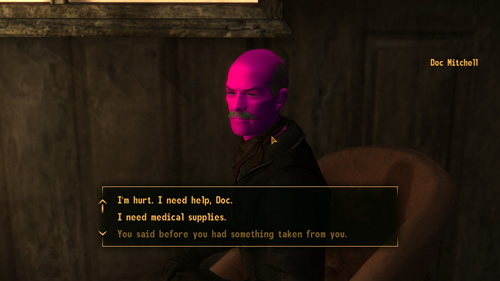
purple_head_2The first game I decided to play after building a new gaming PC was Fallout: New Vegas. Unfortunately, I installed both Steam and New Vegas before I finished tweaking my video drivers which resulted in some very bizarre purple/pink textures or shaders. As you can see from the picture above, poor Doc Mitchell was the first victim.

I fixed it by uninstalling New Vegas and Steam (I could have probably just uninstalled the game, but I wanted to be 100% certain), getting all my video drivers and settings properly tweaked (including the newest version of DirectX), and reinstalling. When I started the back game back up, not only were the textures and shaders correct, but I had also fixed an occasional crasher I got when the New Vegas launcher started up (which I believe had to do with the detection of DirectX).

I later came across this post which may have saved me the trouble of reinstalling. It recommends holding down “A” when the game loads until the Bethesda logo appears which apparently clears some sort of cache, fixing the issue for some Oblivion players. I have no idea if this works for Fallout, but it’s probably worth at least trying before reinstalling.